


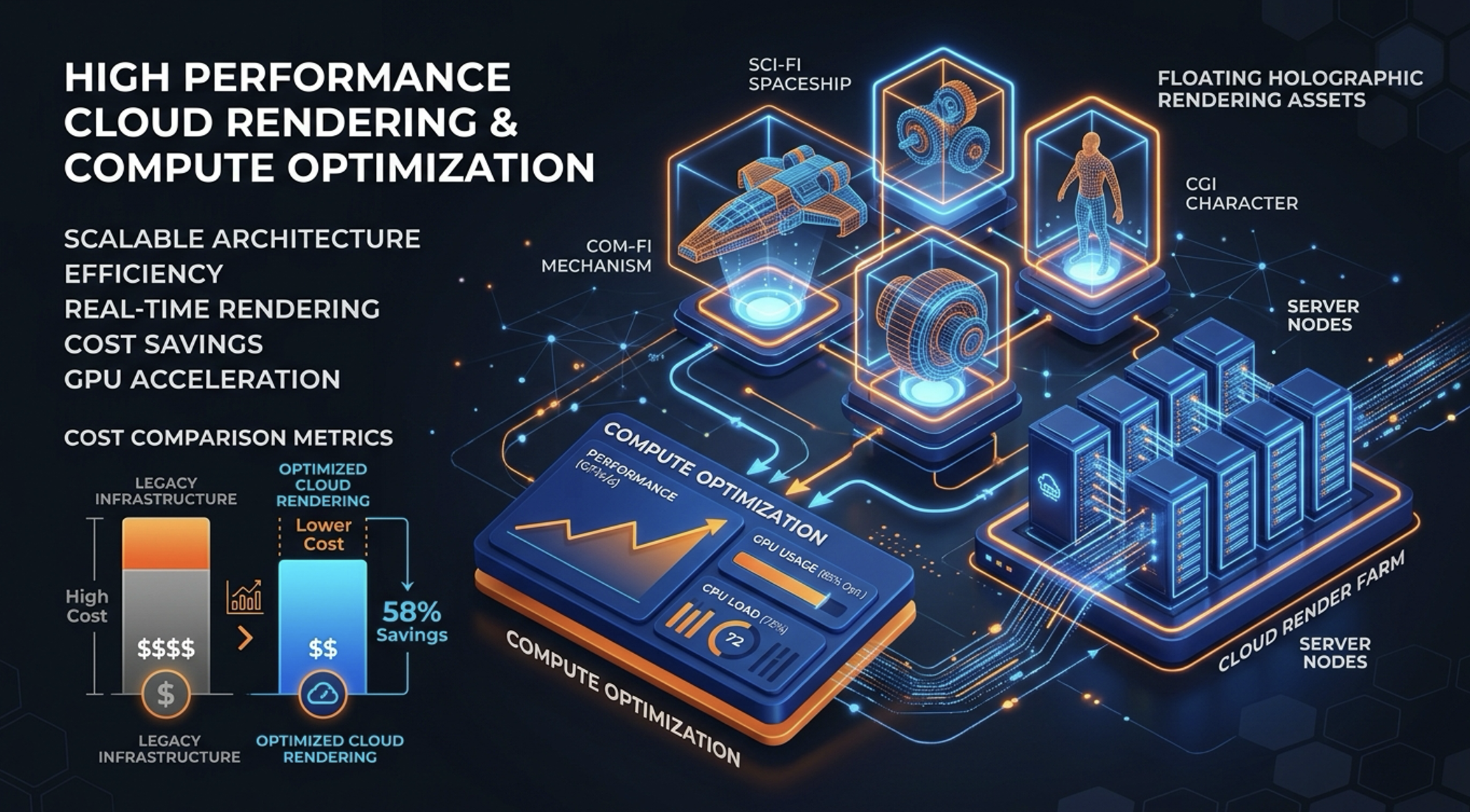
Figure 1: High-performance cloud rendering architecture and compute optimization breakdown.
For visual effects (VFX), animation, and architectural visualization studios, render compute is often the single largest variable cloud infrastructure expense. A major feature deadline or high-resolution sequence can quickly scale a render farm to thousands of compute cores or multi-GPU instances.
When running on major cloud providers like AWS, the infrastructure dilemma inevitably boils down to one critical trade-off: Amazon EC2 Spot Instances versus On-Demand Instances.
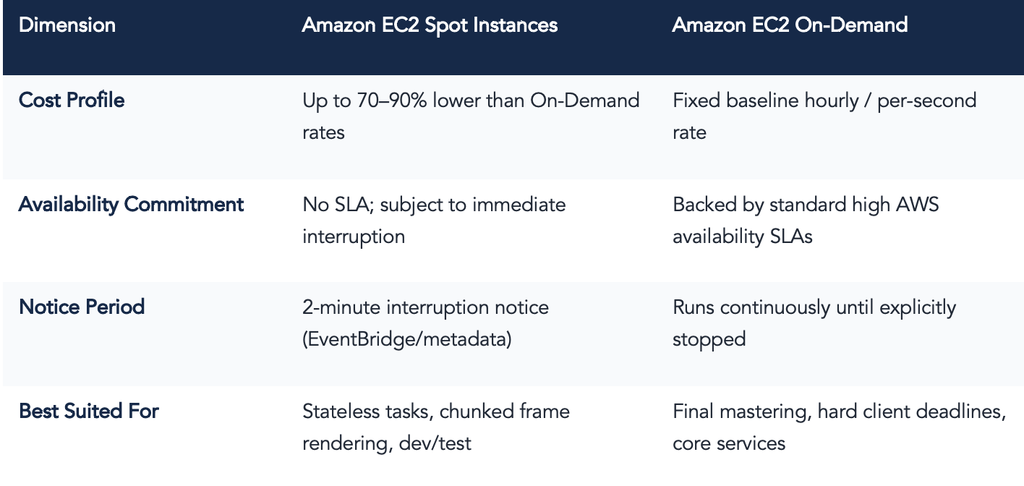
- Spot Instances: Offer up to 90% discounts compared to On-Demand pricing by letting studios bid on spare cloud compute capacity.
- The Operational Risk: That deep discount comes with a major caveat AWS can reclaim the instance with only a two-minute warning if capacity demand spikes across the region.
If a 4K frame takes 45 minutes to render and the instance gets reclaimed at minute 43 without intermediate checkpointing, that compute time and the anticipated cost savings is completely vaporized.
Here is a pragmatic look at how modern studios navigate the Spot vs. On-Demand matrix, design resilient rendering architectures, and maintain predictable delivery timelines without overpaying.
1. Comparing the Economics and Risk Profiles
2. When Spot Excels: The Ideal Workload Profile
Spot compute is a natural fit for compute-intensive rendering workloads that satisfy three key criteria:
- Short Task Granularity (Frame-level Rendering): If your pipeline renders individual frames taking between 2 to 15 minutes, interruptions only affect a single frame rather than an entire multi-hour sequence, keeping compute waste negligible.
- Stateless Render Nodes & Scalable File Storage: Worker nodes pull tasks from a central queue (e.g., AWS Batch, OpenCue, or AWS Thinkbox Deadline) and fetch scene assets directly from high-throughput enterprise file systems such as Dell PowerScale, Qumulo, Amazon FSx for Lustre, or Amazon S3. Qumulo’s scalable file data platform on AWS provides the multi-gigabit throughput and low latency needed to feed massive burst compute fleets without introducing storage I/O bottlenecks.
- Automated Retry Mechanics: When a node is evicted, the render scheduler automatically marks the incomplete frame as failed and re-queues it onto another healthy worker node with zero manual engineering intervention.
3. The Reference Architecture: Resilient Spot-First Pipeline
Rather than choosing strictly Spot or strictly On-Demand, high-performing studio pipelines implement an automated Spot-First, On-Demand Fallback architecture illustrated in the workflow diagram below.
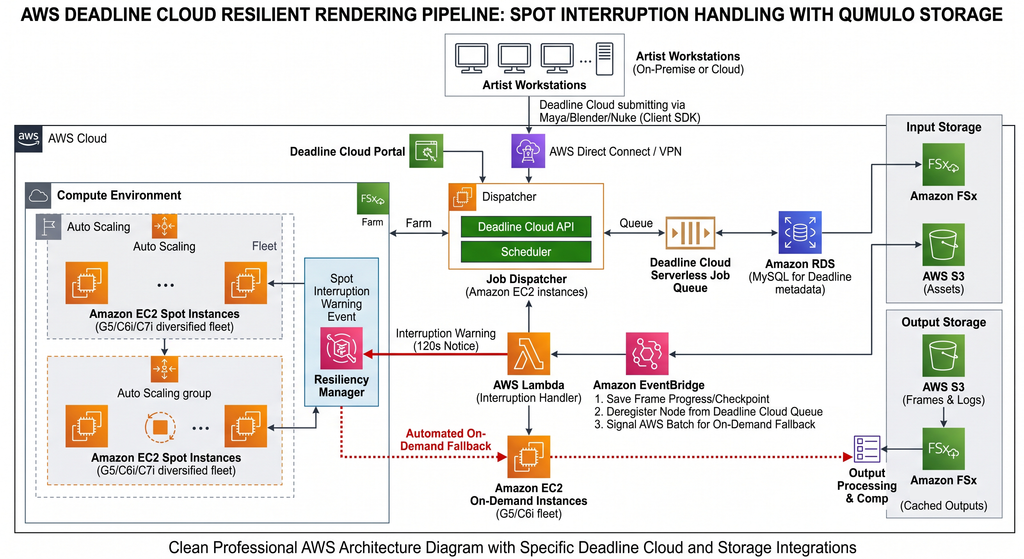
Figure 2: AWS Automated Cloud Rendering Architecture with Spot Interruption Handling and On-Demand Fallback.
Core Workflow Components:
- Job Dispatch & Orchestration (AWS Batch / Thinkbox Deadline): Artists submit tasks into queues categorized by production urgency (e.g., High-Priority Finals, Daily Batch, Long-Running Simulations).
- Diversified EC2 Spot Fleet: Avoid anchoring render farms to a single instance family (e.g., only c6i.16xlarge). By configuring Spot Fleets across diversified instance families (c5, c6i, c7i, m6i, g5) and multiple Availability Zones, studios avoid single-pool capacity exhaustion.
- High-Performance Hybrid/Cloud Tier: Eliminated storage chokepoints during burst rendering by coupling elastic Spot instances with a linearly scalable file data platform, maintaining steady I/O across thousands of concurrent cores.
- Automated Interruption Handling (Amazon EventBridge & Lambda): AWS broadcasts an EC2 Spot Instance Interruption Notice 120 seconds prior to termination. EventBridge triggers a Lambda function that flags the render manager to halt dispatching new frames, checkpoints active work where supported, and gracefully deregisters the instance.
- On-Demand Auto-Fallback: If Spot allocation pools dry up or a client turnaround hits a critical delivery milestone, the orchestrator triggers an On-Demand Auto Scaling Group (ASG) to ensure uninterrupted completion on schedule.
4. Key Best Practices to Minimize Production Risk
A. Implement Mid-Frame Checkpointing (Tiled / Bucket Rendering)
For Arnold, V-Ray, Karma, or Blender Cycles renders where frames take upwards of 30 minutes, configure bucket or tiled output that syncs progressively to shared storage. If interrupted, the newly assigned worker resumes from the remaining unrendered tiles rather than restarting from zero.
B. Use Price-Capacity-Optimized Allocation Strategies
Configure your EC2 Spot Fleet allocation strategy to ‘Price-Capacity-Optimized’. This algorithm selects pools that provide both deep capacity and the lowest likelihood of interruption, delivering the optimal balance between cost savings and fleet stability.
C. Tier Workloads by Production Phase
- LookDev, Rough Cuts, and Batch Dailies: 100% Spot compute. Unscheduled retries cause negligible business impact.
- Final 4K Comp & Hard Client Deadlines: 70/30 Spot-to-On-Demand split, or 100% On-Demand / Savings Plans during critical crunch hours.
Summary Takeaways for Production Leads
- Cost vs. Predictability: Spot is not free compute; it is a financial model traded against engineering operational rigor.
- Storage is as Critical as Compute: Even the cheapest Spot instances become expensive if idle cores are starved of I/O while waiting for heavy textures and scene files.
- Diversification is King: Never limit your fleet to one instance flavor or a single Availability Zone.
| Optimize Your Studio’s Cloud Rendering Pipeline with IMT Architecting an enterprise render farm that strikes the ideal balance between burst speed, storage throughput, and budget predictability doesn’t have to be guesswork. At IMT, our dedicated Media & Entertainment cloud and storage architects work side-by-side with studios to design, deploy, and benchmark resilient hybrid rendering workflows across AWS and high-performance storage. Looking to optimize your cloud render farm, cut compute waste, or eliminate storage bottlenecks? Reach out to IMT today to schedule an infrastructure assessment and take control of your render economics. |